
OwnCDN
Edit this page

Did you notice something wrong or unclear, or want to add something more to this page?

You can edit the source text of this page on GitHub (click here to learn how).

After you submit your changes ("pull request"), we will review it and update the page.

We appreciate any contribution - big or small.

How to reset the UI password

If you have lost / forgotten the UI password for your OwnCDN installation, you can reset this by opening the "OwnCDN.config.json" file (in the data folder) with a text editor, delete the "PWHash" line, re-save the file, and then restart OwnCDN.
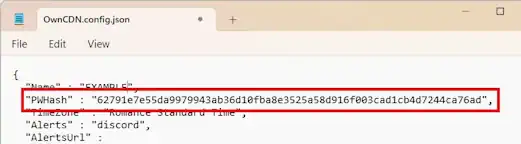
The next time you open the OwnCDN web UI, you will be prompted to enter a new password.

OwnCDN

  • Home
  • Product details

  • Features
  • Screen shots
  • Download

  • Download
  • Buy

  • Buy license
  • Support

  • Overview
  • Lost License Key
  • Knowledge Base
  • Online documentation
  • Contact us