
Make sure that the OwnCDN process (app pool identify if under IIS) has write access to the data folder that you specify.
By default, OwnCDN stores its data files in a "data" subfolder under the folder from where OwnCDN is installed (where the "OwnCDN.exe" file is).
This can be changed by updating the "data_dir" setting in the "appsettings.json" file, by setting the environment variable "DATA_DIR", or by using the --data_dir command line option (when running from the command line):
Using "appsettings.json"
Edit the "appsettings.json" file in the folder where OwnCDN.exe is located and update the "data_dir" setting with the location of the data files:
{
  "Logging": {
    "LogLevel": {
      "Default": "Information",
      "Microsoft.AspNetCore": "Warning"
    }
  },
  "AllowedHosts": "*",
  "data_dir": "e:\data\owncdn"
}
If at some point you update OwnCDN to a newer version, make sure that you don't overwrite the "appsettings.json" file - or that you re-add this setting.
Using environment variable
You can set the data folder location using the "DATA_DIR" environment variable (which is not vulnerable to appsettings.json file overwrite at update).
Setting the "DATA_DIR" environment variable in any way, overides the "data_dir" setting in the appsettings.json file.
Running under IIS
When running one or more instances of OwnCDN under IIS, you can set the data location for each instance at a website level. Do the following for each OwnCDN site in IIS:
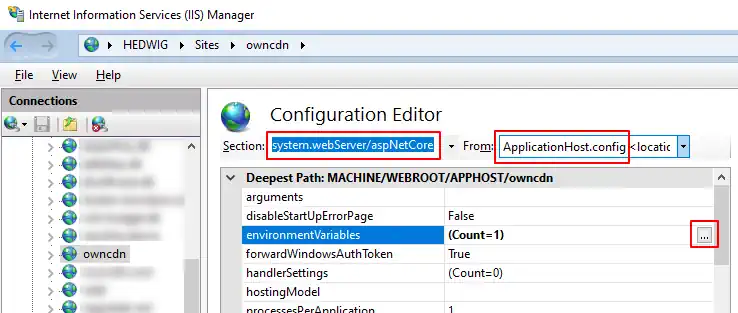
In IIS Manager, select the OwnCDN site, under "Management" double-click "Configuration Editor".
Under "Section" select "system.webServer/aspNetCore", and under "From" select "ApplicationHost.config", click the "..." button next to "environmentVariables":
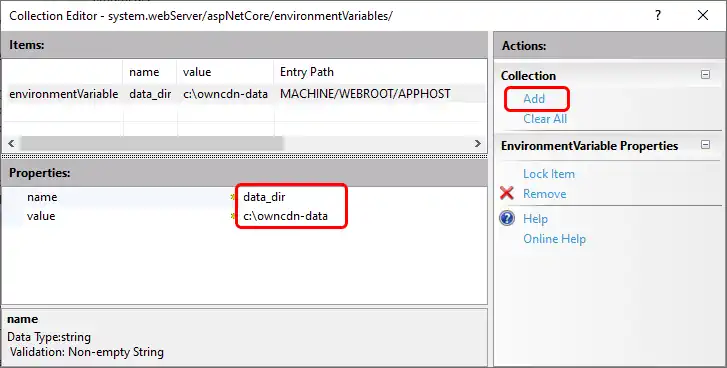
In the "Collection Editor" window, click the "Add" link and add a value for "DATA_DIR" with a value of the data folder:
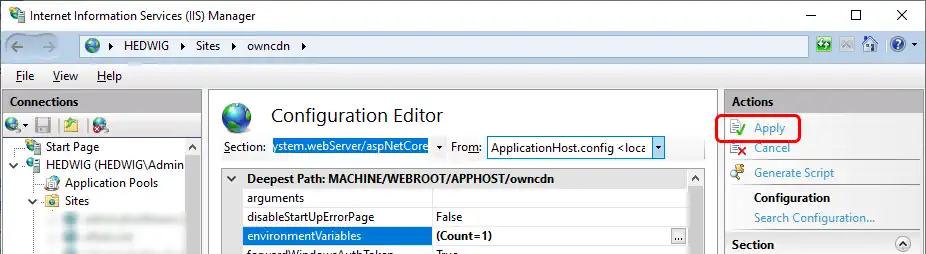
Click the "Collection Editor" window and make sure to click "Apply" back in the main IIS window:
Running from command line
When running OwnCDN from command line, you can set the location of the data files (before running owncdn.exe) by typing set DATA_DIR=e:\data\owncdn or use setx to configure a permanent environment variable (type setx /? for usage).
Using command line option
When running OwnCDN from command line, you can set the location of the data files using the command line option --data_dir like this:
owncdn.exe --data_dir C:\owncdn-data
Using the "--data_dir" command line option, overides both the "data_dir" setting in the "appsettings.json" file, and the "DATA_DIR" environment variable.